
![SAMSUNG Tool 3 Month Activation [ Samsungtool.us ] (KG LOCK Bypass) Api✅](/media/photo-2025-12-29-10-53-26.jpg)
SAMSUNG Tool 3 Month Activation [ Samsungtool.us ] (KG LOCK Bypass) Api✅
Digital product. No refunds, no returns.
Usually, the order is processed within 1-2 minutes from the moment when we have received your payment in full
Instant Place • 100% Secure Process and Delivery
KG LOCK BYPASS SOLUTION
Factory Reset with Confidence using Samsung Tool
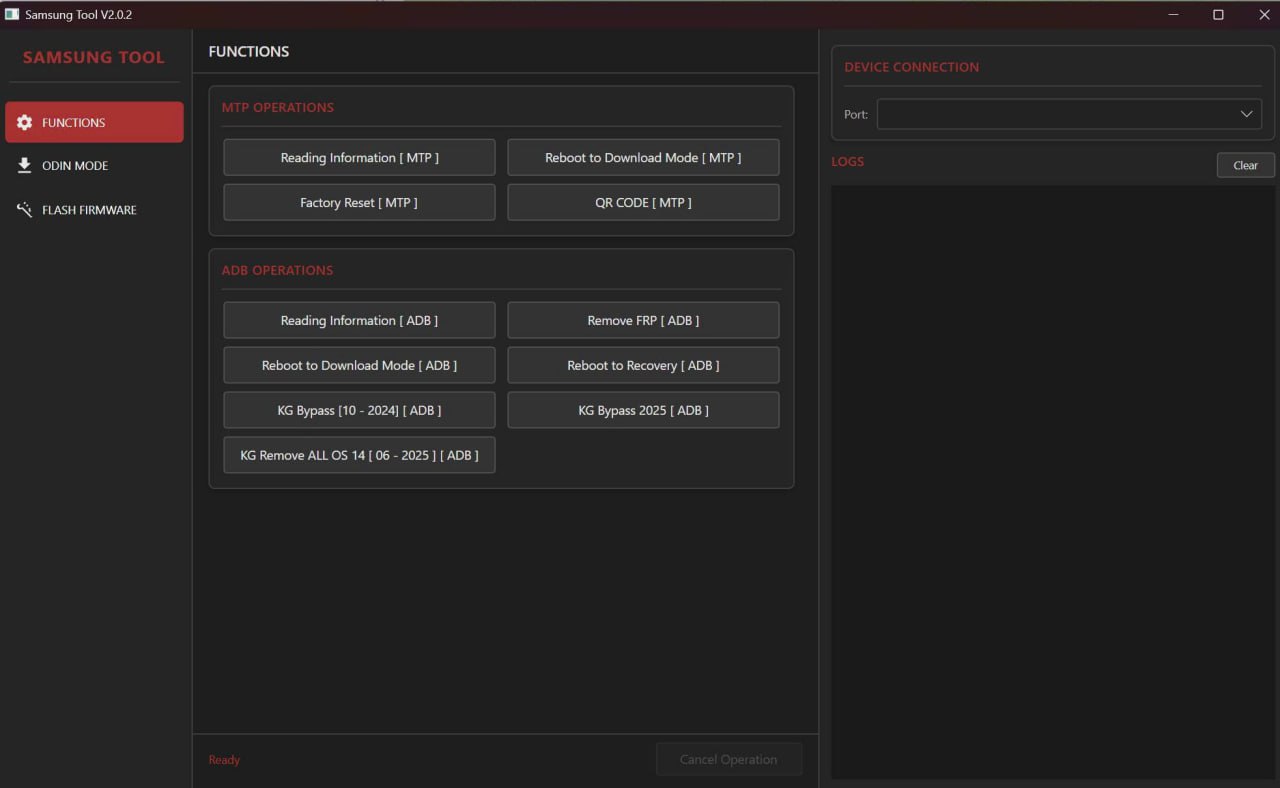
Key Features
Completely hides all Knox Guard notifications and restrictions, allowing you to use the device like normal.
Perform a factory reset with peace of mind. The device will not re-lock, and you remain in full control of your data.
Just a few clicks to complete. No deep technical knowledge required—perfect for all users.
Software-based solution that does not interfere with your device's hardware or internal system components.
Step-by-Step Guide
PART 1: Preparation
- Computer (PC/Laptop): Ensure Samsung USB drivers are installed.
- High-Quality USB Cable: For a stable connection during the process.
- Software: The
KG Remove All OS 14tool must be ready on your computer. - Phone: Battery should be above 50% to prevent shutdown during the operation.
PART 2: Steps to Follow
- Access QR Code Scanning Mode: Boot to the "Hello / Welcome" screen and tap repeatedly on an empty area until the QR scanner appears.
- Scan QR Code to Enable ADB: Use the tool on your computer to display the QR code. Scan it with your phone and enable
USB Debuggingwhen prompted in Developer Options. - Run the Bypass Tool: Connect the phone to the PC via USB. When prompted, allow USB Debugging. Then, execute
KG Remove All OS 14in the software. - Reboot and Factory Reset: After the tool finishes, the phone will reboot. Navigate to Settings → General Management → Reset → Factory data reset to erase all data.
- Check and Complete: After rebooting, set up the phone as usual. If there's no KG Lock or MDM prompt, the bypass is successful.
PART 3: Troubleshooting
Download
Click below to download the latest version of the tool: https://samsungtool.us/SamSungTool.zip
Make sure to install Samsung USB drivers before use.
Supported Models
| Series | Model Range | Supported OS |
|---|---|---|
| Galaxy A Series | A10 - A72 | Android 10 - 14 |
| Galaxy M Series | M11 - M62 | Android 10 - 14 |
| Galaxy S Series | S9 - S24 | Android 10 - 14 |
| Galaxy Tab Series | Tab A, Tab S6 Lite, etc. | Android 10 - 14 |
Note: OS 15 is not supported at this time.
Important Notes
Repair shops, technicians, and end users who need to use their device immediately without waiting.
Inbox now for a detailed consultation and pricing!
-
SamsungTool.us - [Credits For Existing User ] ✅
Miniutes -
Samsung Tool 1 Years Activation [Samsungtool.us] (KG LOCK Bypass) Api✅
1-5 Miniutes -
SAMSUNG Tool 6 Month Activation [ Samsungtool.us ] (KG LOCK Bypass) Api✅
Instant -
SAMSUNG Tool 1 Day License + 10 Credit [ Samsungtool.us ] (KG LOCK Bypass) Api✅
Instant